Frequently Asked Questions
to employers
Answers about publishing and promoting job advertisements on Jobportal.
Publishing a job listing
Registration and account creation
You can upload a job listing for free by creating an employer account or signing in with an existing employer account. During registration, you need to provide your name, email address, and create a password. We recommend using your work email address. Creating an account does not commit you to anything. Register as an employer here.
After creating an account, you can complete your company profile, add your logo, and provide a company description. To publish a job listing, you need to add job details, the listing content, a cover image, and a URL address where you want applications to be directed (*optional).
I have created an account
Jobportal collects job listings from publicly available sources, including TE Services. If a job posting originates from TE Services, this will be shown in the listing, and candidates will be directed to the application link provided on the TE Services website.
If we discover your job listing through a public source, we will automatically create an account for you. Using your account, you can update the listing details, customize its appearance, and decide where applications should be sent.
Unless you update your settings, applications will be automatically sent to the address provided for the job listing on the TE Services website. You will receive an email notification when an application is submitted to your listing via Jobportal. We recommend updating your password after your first login.
I didn't receive a new password
You can request a new password on the login page by selecting “Forgot your password? Reset it here.” We will send a new password to the email address you provided. If necessary, you can contact customer service at asiakaspalvelu@jobportal.ee or by calling 020 734 6902.
Deleting an Account
If you would like to delete the account created for you, please contact customer service at the following email address: asiakaspalvelu@jobportal.ee or by calling 020 734 6902.
Post a Job Listing
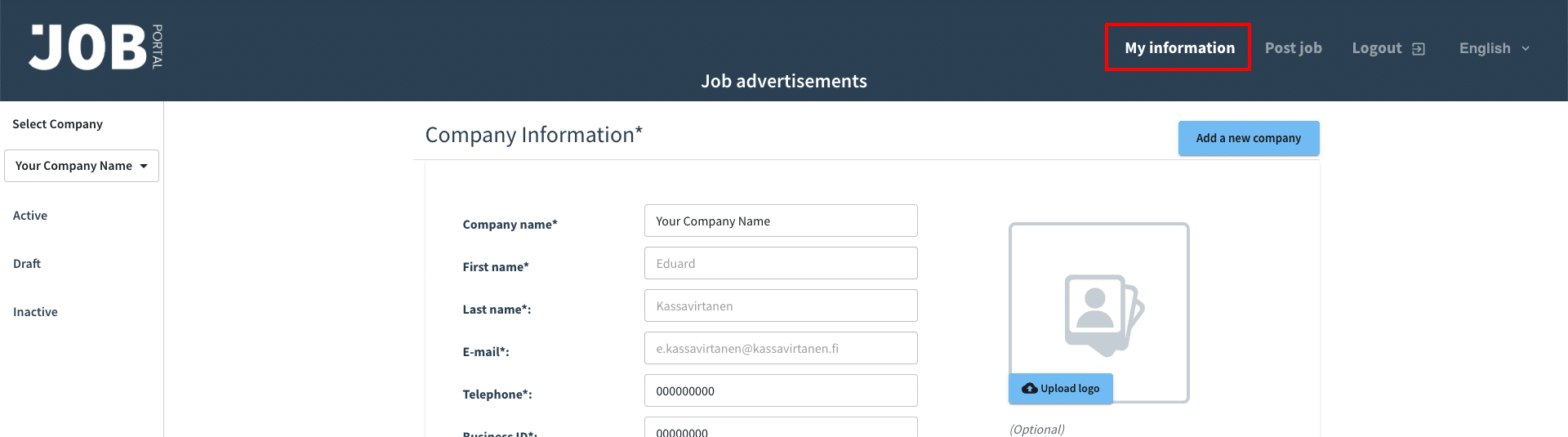
You can post a job listing by logging in to your employer account. The first time you log in after registering, you’ll need to fill out your company information in the “My Details” section. Enter your company name, the name and email address of the person responsible for hiring, your company’s phone number, logo, business registration number, and address. If you wish, you can also add your company’s website and a profile description. This information will appear at the end of the job posting. If the job posting is published via a public source, some of the company details will already be pre-filled.
Sharing an account with another person
You can give other people access to your company profile by adding their names and email addresses under “Personal Details”. New users will receive an email with their login information. They will receive the same notifications as the profile owner and have the same access rights and visibility as the profile owner. Removing a user from the list will prevent them from accessing the profile with their existing credentials.
You can add the same user again later, and new login details will then be provided. Please note that users registered as job seekers on Jobportal cannot be added to an employer profile.
Reactivating a job listing
Our system keeps expired job postings, allowing you to access previous postings, review their statistics, and reactivate them whenever needed. You can find your old job postings in the “Inactive” section. If you have previously purchased a campaign package for a job posting you want to activate again, you can reactivate it free of charge. After reactivation, you can add a new campaign package by selecting “Buy campaign package” within the job posting.
I am unable to publish a job posting
If you receive an error message when publishing a job listing, please contact us at the following email address asiakaspalvelu@jobportal.ee or by calling 020 734 6902. We will always resolve issues as quickly as possible and get back to you.
Editing and Deleting Job Listing
You can edit a job listing by logging into your account and clicking the “Open” button. You will find the “Edit” button at the top and bottom of the listing. Remember to save your changes by clicking “Publish” at the end of the listing. You can preview the listing before publishing it.
To remove a job listing, log in to your account and click the “Delete” button below the job listing.
Multiple companies and job listings
You can add multiple companies to a single user account. You can switch between companies on the left side of the page and create job postings and campaigns tailored to different companies. To post a new job listing, click the “Post a Job” or “Create a New Job” button and fill out the required information on the form.
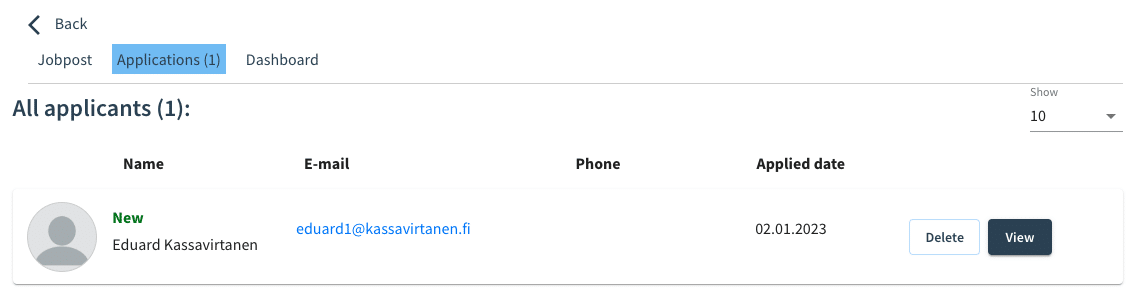
All submitted applicationsfor your job listings are available in your company profile. When you receive new applications, we will notify you by email. Through Jobportal, you can contact candidates directly and conveniently manage the next steps of the recruitment process.
I can't find my job listing
You can log in to your company profile by entering the email address and password you used when creating it. If you’ve received an email from us notifying you that your job posting has been published on Jobportal, you can use the login credentials provided in that email to log in. We recommend that you always change your password the first time you log in. You can find expired job postings in the “Inactive” section of your profile and reactivate them if necessary.
Sama e-posti aadressi ei saa kasutada nii tööandjaks kui ka tööotsijaks registreerumisel.
You cannot use the same email address for both an employer account and a job seeker account. If you cannot access your profile, please contact our customer support team via asiakaspalvelu@jobportal.ee or by calling 020 734 6902.
Why should I publish a job listing on Jobportal?
Publishing a job listing on Jobportal is currently one of the most affordable and easiest ways to reach job seekers.
- Publish your job listing in one platform where managing and comparing candidates is simple and convenient.
- Ability to group candidates based on their suitability.
- Ability to add candidate notes and share insights with others involved in the hiring process.
- Invite your team members to participate in the recruitment process.
- With the ATS system, you can easily stay in contact with candidates.
To make sure your job posting reaches the right candidates, our campaign packages help boost its visibility and reach. A professional, targeted recruitment campaign gives your vacancy greater exposure and ensures it is promoted where potential job seekers are most active.
- Reach a wider pool of candidates and build a stronger employer brand on social media.
- Manage applicants efficiently and provide a smooth candidate experience.
- Our services are also ideal for your first recruitment process.
Campaign packages
Promoting a job listing
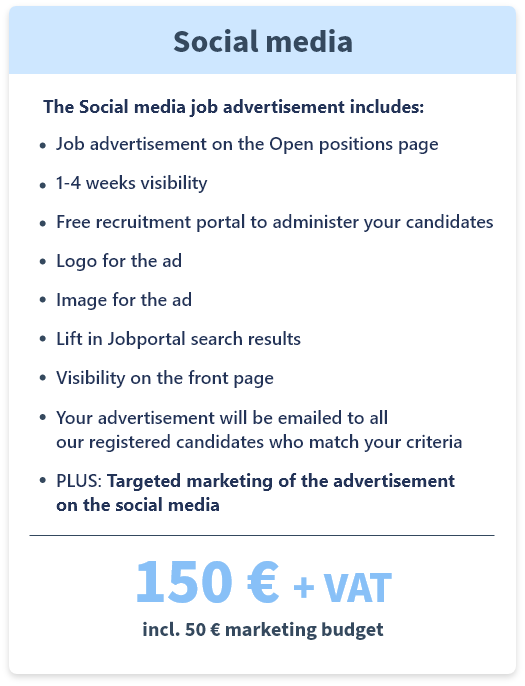
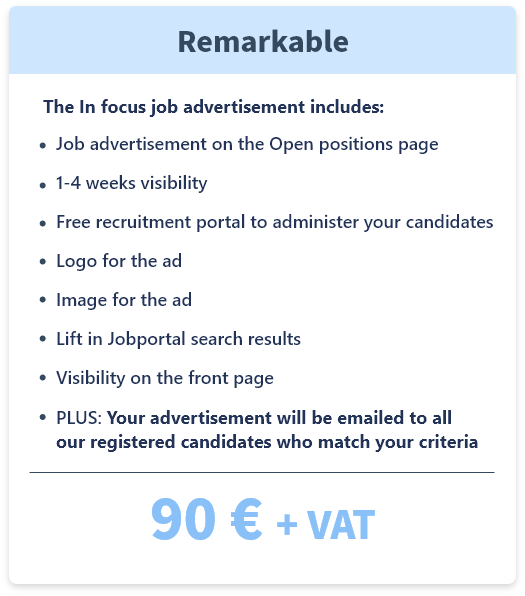
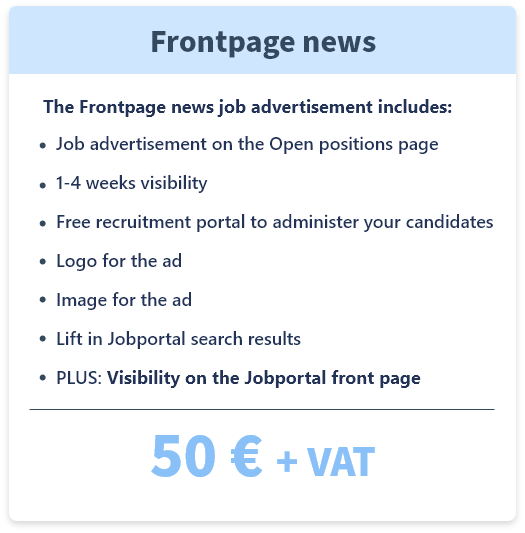
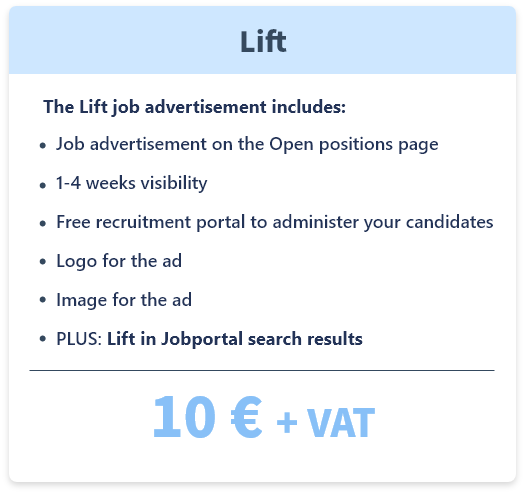
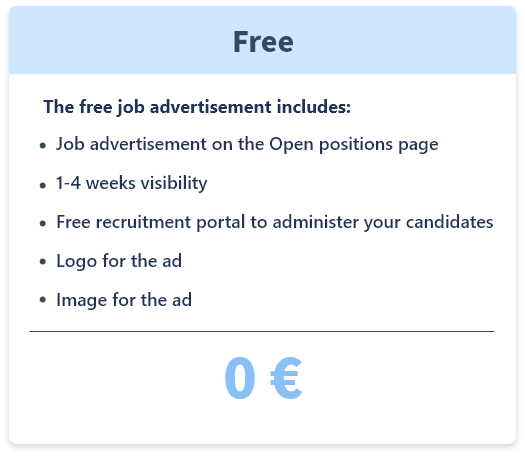
You can promote your job listing on Jobportal and social media channels by purchasing a campaign package. Jobportal currently offers four different paid campaign packages designed to support the diverse recruitment needs of companies. You can find more information about the campaign packages here .
Campaign packages are created using Jobportal’s designs. At the moment, custom company branding cannot be used in campaign materials. However, you can enhance your job posting by adding your company logo, promotional images, and using various text formatting options to make the listing more attractive.
What are the benefits of using campaigns?
Campaigns ensure that your job postings appear where potential candidates are most active. Increased visibility across mobile devices and social media helps you reach more passive candidates. Passive candidates are people who may consider a new job opportunity but are not actively looking for a new role, or who follow specific companies and their available positions.
Not every company chooses to use traditional recruitment services, as they can often be costly. Many businesses want to take an active role in finding their first employees without having to invest thousands of euros. Jobportal was created to make recruitment more accessible. Our goal is to help smaller companies successfully attract talent and hire new employees. We provide affordable campaign packages that improve job posting visibility and help employers reach candidates through recruitment channels, email campaigns, and targeted social media promotion.
The most effective campaign package for attracting job seekers is Social Media Star. It ensures your job posting receives increased visibility by appearing among the first search results on the homepage and being promoted through targeted social media campaigns with a budget of €50 (or your preferred amount). The campaign is carried out by the professional marketing agency Mediaspark.
Why choose targeted digital recruitment advertising?
- Top candidates are not always actively searching for a new job, but they may still be interested in the right opportunity.
- Targeted digital advertising is a much more cost-effective solution compared to traditional recruitment agencies.
- A professional marketing agency ensures your advertisement reaches the right audience through effective social media targeting.
- The agency has the expertise and experience required to navigate today’s fast-changing digital landscape.
Did you know that social media advertising for job postings is subject to restrictions related to discrimination? Experts in targeted advertising understand that reaching the right audience is crucial - poor targeting can significantly reduce campaign performance. A failed recruitment campaign may also negatively impact other campaigns running through the same advertising account. To avoid these challenges, we recommend promoting job opportunities through job platforms that specialize in recruitment and have established experience with social media-based job advertising. Platforms like Jobportalare designed to connect employers with relevant candidates more effectively.
A job listing published with the “Social Media Star” campaign receives an average of 250 views even without additional funding. Results are influenced by several factors, including the nature of the position, the popularity of the industry, and the company’s employer brand. In more popular sectors, the same campaign can generate an average of up to 450 views without additional funding.
Hint!
You can boost your job posting’s visibility at any time by adding a campaign package later.
Not sure which solution is right for you?
Send us a message, and we’ll be happy to assist you.
We find,
you choose
Telephone: 020 734 6902
Email: asiakaspalvelu@jobportal.ee
Customer support hours:
Mon–Fri: 9:00–17:00
Sat–Sun: Closed